

Region of Interest (ROI)
The abbreviation ROI explained
The abbreviation ROI comes from English and stands for Region of Interest, which is translated into German as „Bereich von besonderem Interesse“ (area of particular interest).
Regions of interest (ROI) can be programmed into the field of view of the surveillance camera as such in order to mark special image areas that are of great importance to the user. These marked image areas are displayed by the surveillance camera with the highest possible image quality. In contrast, unimportant areas in the image, such as trees in the background, are displayed with a low image resolution.
Setting up ROI areas significantly reduces network load, because less data has to be transmitted by the respective surveillance camera. Unnecessarily used storage space is also saved, which enhances the video surveillance system.
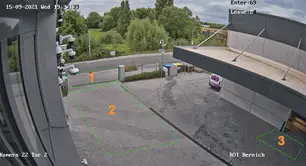
The illustration below shows an example of setting a ROI „area of particular interest“ in the image area of a surveillance camera. The trees and the street in the background are not relevant to our surveillance area and are therefore of no interest. The same applies to the canopy of the building on the right side of the image. These areas are displayed with reduced resolution. The areas marked in green, on the other hand, are displayed and recorded with the best possible resolution .
ROI settings for particularly important areas of a surveillance camera can be made and configured in two different ways: manual ROI programming and automatic ROI programming.
The first option for setting a ROI is for the user to draw it manually in the image area of the surveillance camera. Once these manually drawn ROI areas have been saved in the settings, they are stored as fixed ROI areas in the camera programming.
It is important to know with manual ROI setup that the marked areas are static and not dynamic. This means that a person moving within the image area of the surveillance camera will only be in focus within the defined ROI areas. Multiple ROI settings in one image area that are defined far apart from each other may under certain circumstances cause problems. This is because, as soon as a person leaves one of the ROI areas in the image and stops, they will only be displayed out of focus until they reach the second ROI area. Therefore, multiple ROI areas should be carefully planned before programming.
A second option for setting a ROI is automatic control.
With this setting, the ROI areas have dynamic properties. The surveillance camera continuously analyzes the image and, based on preset parameters such as facial recognition or license plate recognition, these are displayed with particular sharpness in the encoding.
Due to the dynamic property of the ROI, the direction of movement of the person or vehicle in the image area is no longer relevant. Based on the specified parameters, the surveillance camera always keeps faces and license plates in focus by tracking them within the image.
Thus, surveillance cameras equipped with ROI setting options only use the higher resolution for image areas that are relevant to the video surveillance. Depending on the equipment of the surveillance camera, between 1 and 3 ROI areas can be set. The different ROIs can be set with different resolutions for one video stream of the surveillance camera.