

We present the unboxing of WLAN surveillance cameras from four different manufacturers: Hikvision, Reolink, Dahua, and EZVIZ. All of the surveillance cameras presented are in a budget price segment and designed for simple home monitoring. In this test section, we checked all four camera models for their most important features. You can find the scope of delivery and the first impression after unboxing in our first test section, and in the third test section, we tested the most important technical parameters live.
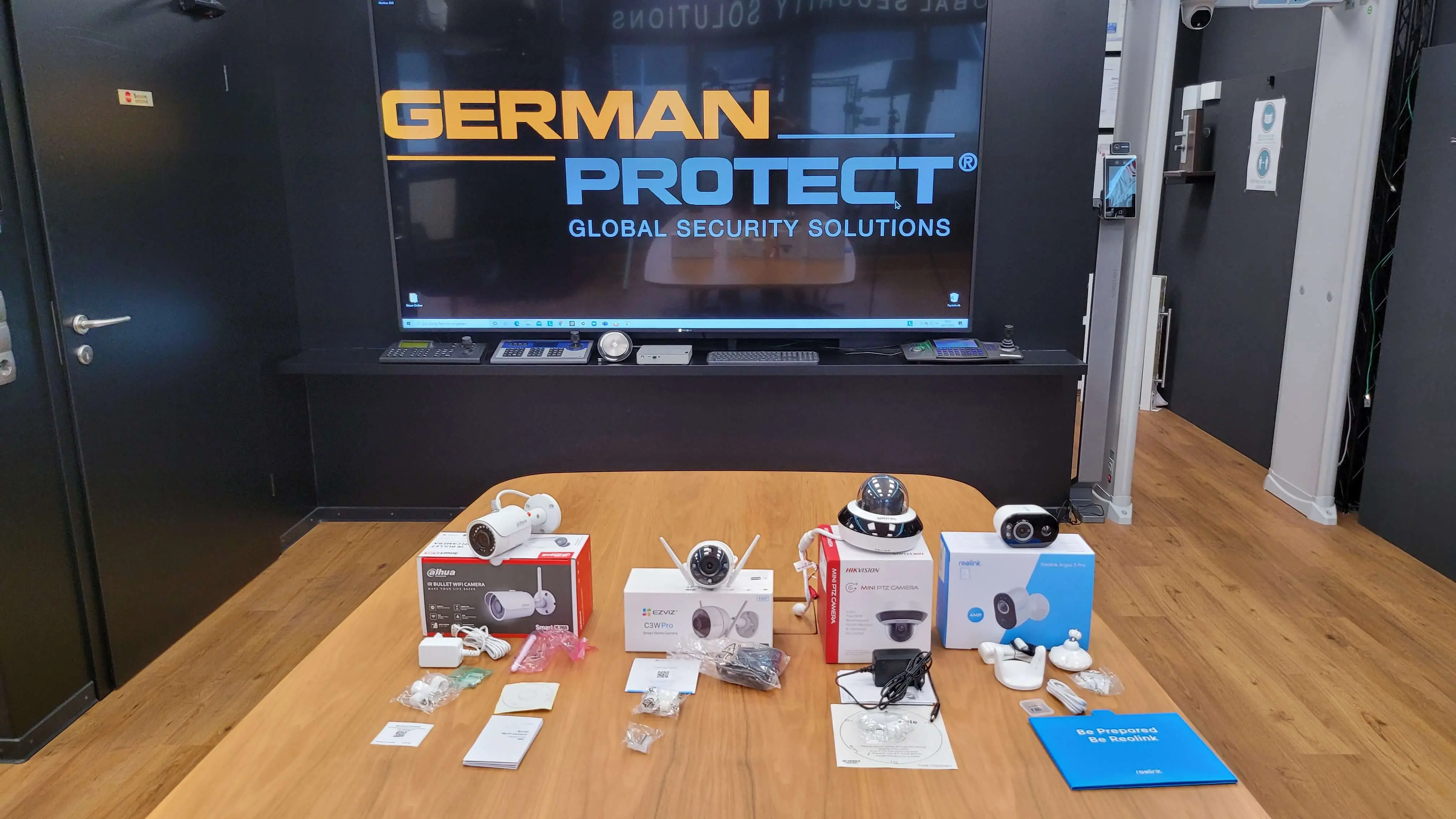
Modern IP cameras with WLAN from various manufacturers offer straightforward installation, quick setup and convenient mobile access via the APP on a smartphone, tablet or notebook. As an IHK-certified installer of video and security technology, we tested four WLAN cameras from the renowned manufacturers Hikvision, Reolink, Dahua, and EZVIZ in our 2022 surveillance camera test. The difference between our tests and most other tests offered on the internet lies in our more than 20 years of experience as a certified installer of video surveillance and security technology. Our 2022 surveillance camera test includes a qualified and independent assessment of the products according to the latest technical standards and security-related aspects of video surveillance technology. All tested models are recommended by the manufacturer as WLAN surveillance cameras for home security and are priced between 95 and 343 euros in the lower price segment for video surveillance.
The independent 2022 WLAN surveillance camera test by ESA GmbH German Protect is aimed at private customers and small businesses looking for a low-cost surveillance solution. The camera systems tested were evaluated and tested by trained specialists. Our goal was to determine which surveillance camera is best suited for home security, not only in terms of price/performance but also based on technological values, along with its advantages and disadvantages.
In the first step of the test, the packaging and scope of delivery were evaluated. You will also find a video of this later in the test. The quality of the packaging and the supplied parts was important here. In the next step, our technicians tested the surveillance cameras based on their design, materials used and handling, and compared the key parameters of the WLAN cameras (see table). In the third phase, we are currently testing the WLAN cameras in a long-term test for image and recording quality as well as functionality and reliability of the alarm notifications. We will publish the test results in our blog around mid-February 2022. These will give you a more in-depth insight into the daily handling of the surveillance cameras and the recordings that can be achieved.
Overview of the tested surveillance cameras:
- Hikvision DS-2DE2A404IW-DE3/W - WLAN dome camera - IP66 / IK10 vandal-resistant - 4MP resolution with a focal length of 2.8 to 12mm and PTZ functions.
- Reolink Argus 3 PLUS* WLAN bullet camera with 4MP resolution and IP65 rating for outdoor use.
- Dahua DH-IPC-HFW1435S-W-0280B-S2 Wi-Fi bullet camera - 4 megapixel resolution and IP67 certification for outdoor use.
- EZVIZ CS-C3W PRO 4MP Wi-Fi bullet camera - 4 megapixel resolution and IP67 certification for outdoor use.
* The manufacturer has discontinued our test product and launched a successor model on the market. Please note that the test parameters therefore no longer match 100% exactly. Should you have any questions, please contact our customer service.
The camera test was based on the following important criteria:
- Scope of delivery, appearance and quality of the materials used
- Commissioning and setup of the camera
- Mounting and mounting options
- Security of the camera on the software and hardware side
- Recording options
- Relevant functions for video surveillance
- Quality of the surveillance images at night and during the day
- Comparison images day/night under different weather conditions
The most important points of the Wi-Fi surveillance camera test 2022 in brief
Areas of use: Before purchasing, you should already have made some basic preliminary decisions. Among the most important decisions is, for example, whether the surveillance camera is for indoor use or outdoor use. Also important for avoiding later disappointment and trouble with the neighbors is deciding which camera form – a bullet camera, a dome camera or a PTZ 360° – is best suited to your surveillance application. Another important point for a purchase decision is knowing in advance which functions the IP camera must have in order to fulfill the expected surveillance tasks. You will find all of this information in detail in our security magazine.
All four test candidates in our test are outdoor surveillance cameras that can of course also be used as indoor cameras. Three of them are bullet cameras, and one is a dome camera equipped with additional PTZ functions (pan, tilt and zoom).
Wi-Fi or wired surveillance cameras: Wired models are more tamper-resistant, offer high resolutions and far more reliable image transmission than a Wi-Fi camera, which, however, can be mounted more easily and quickly. Battery-operated Wi-Fi surveillance cameras are even easier and quicker to mount, but require laborious and regular recharging. Many manufacturers offer the option of equipping a battery-operated Wi-Fi camera additionally with a solar panel and thus recharging it regularly. In Germany, especially in winter, when there are hardly any sunny days and the low temperatures cause the batteries to discharge much faster, the charging cycles are often not sufficient for reliable, continuous functionality.
All four surveillance cameras in our test are Wi-Fi cameras.
Resolution: Most WLAN surveillance camera manufacturers offer a 2 megapixel Full HD or maximum 4 megapixel 2K resolution so that, due to the high data transfer over WLAN, no so-called latency (image delays) can occur in the recordings or in the live view. For this reason, resolutions of 4K and higher are rarely offered by reputable manufacturers.
Even if the surveillance camera includes an SD card for recordings, missing frames are to be expected with fast movements, such as running quickly through the image area.
High resolutions offer sharper and more detailed images, but many surveillance cameras fail at night in particular, because their image sensor is too small and cannot capture enough light for a perpetrator 10 meters away to be clearly recognizable in the surveillance image. The resolutions of the IP cameras we tested in this review all correspond to 4 megapixel 2K.
Recording: Most manufacturers of WLAN surveillance cameras typically offer recording options directly on the camera, using an SD memory card. This type of recording is relatively insecure, because if the surveillance camera is stolen, the recordings are lost as well. Recording options offered by the manufacturer for a fee in a cloud on the internet should be approached with great caution. One never knows in which country the data is stored or who has access to it. The most secure way to store surveillance footage is on an NVR (Network Video Recorder) or on a local drive in a NAS (Network Attached Storage) device.
All four WLAN surveillance cameras in our test have an integrated SD card slot that enables recording.
Strong performance and parameters of the cameras in direct comparison
| Reolink Argus 3 Pro | Dahua DH-IPC-HFW1435S-W-0280B-S2 | EZVIZ C3W PRO 4MP | Hikvision DS-2DE2A404IW-DE3/W(2.8-12mm) | |
| Installation location | Outdoor | Outdoor | Outdoor | Outdoor |
| Power supply (cable or battery) | no, battery-powered (solar panel available as an option) | Cable | Cable | Cable |
| Resolution | 4MP (2560x1440) | 4MP (2560x1440) | 4MP(2560x1440) | 4MP (2560x1440) |
| Night vision | IR 10m | IR 30m | IR 30m | IR 20m |
| App | Yes | Yes | Yes | Yes |
| Data storage | Cloud + Local on Micro SD up to 128GB | Local on Micro SD up to 256GB | Cloud + Local on Micro SD up to 256GB | Local on Micro SD up to 256GB |
| Microphone | Yes | No | Yes | Yes |
| Audio | Two-way audio | No | Two-way audio | No |
| Protection rating | IP66 | Dust- and waterproof per IP67 | Dust- and waterproof per IP67 | Vandal-resistant IK10 + IP66 |
| Motion detection | People & Vehicles | Motion detection only | People & Vehicles | People & Vehicles + Face recognition |
| Privacy zone masking | Yes | Yes | No | Yes |
1. Test: Reolink Argus 3 Pro
Scope of delivery, appearance and quality of the materials used
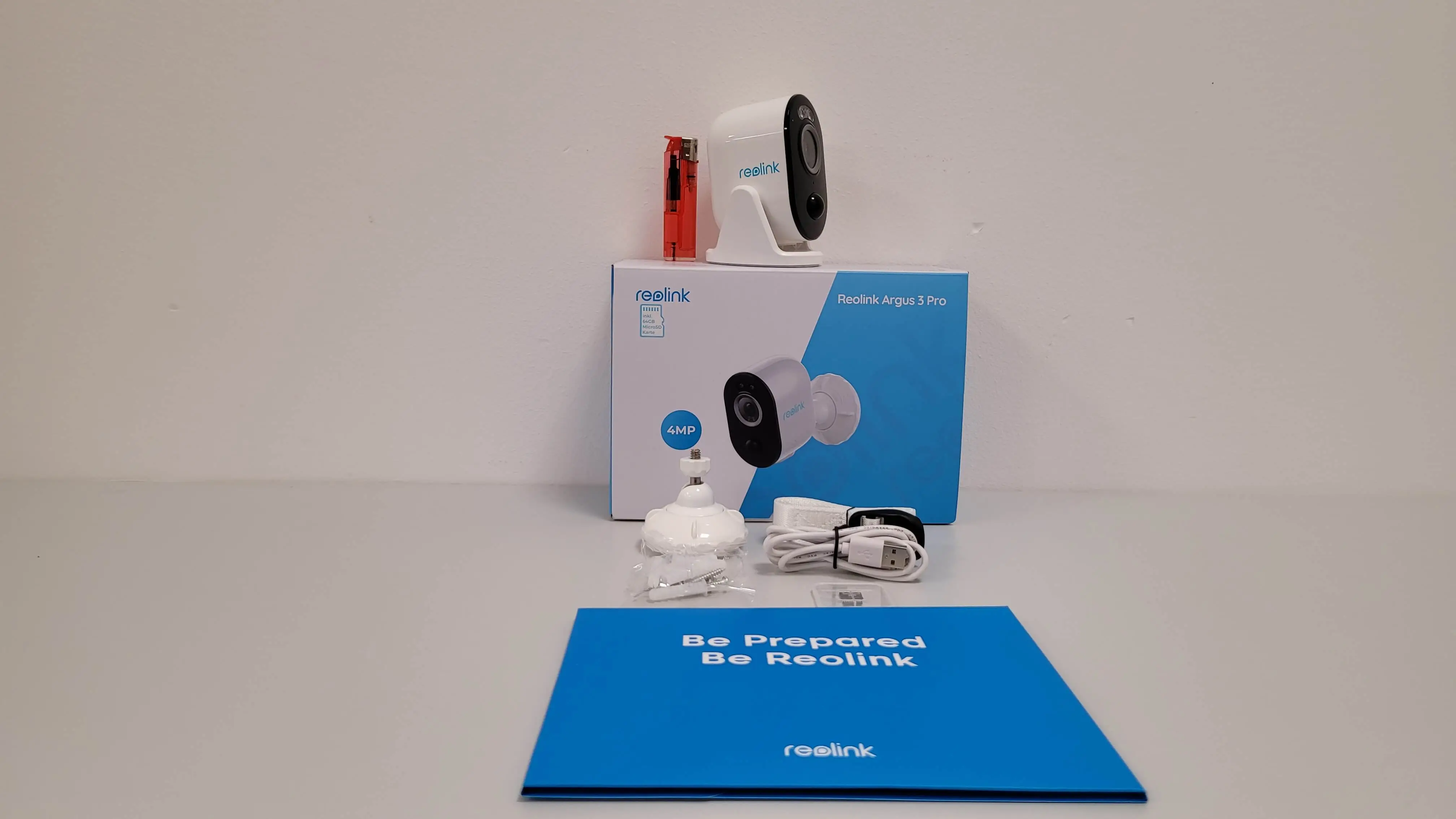
The scope of delivery of the Reolink Argus 3 Pro is quite extensive and even includes a 64GB SD card for recordings. In addition to the wall mount, Reolink also supplies a hanging strap for mobile use. One drawback is the charging device, which only includes a USB cable, so the camera can only be charged via USB. Charging from a power outlet is not possible with the scope of delivery. Another disadvantage is that the batteries are permanently built into the camera and can therefore only be charged together with the camera. Reolink does offer a solar panel that allows the camera to charge itself during the day, but it is only available for an additional charge and must be ordered separately. Given the number of sunny days in winter, continuous charging of the surveillance camera via the small solar panel is also questionable, but we will be testing this soon as well. The scope of delivery includes a short operating manual in German for setting up the app. Unfortunately, no operating manual for setting up the camera functions is included. It is only available as a download in English in the Reolink portal.
The appearance of the Reolink Argus 3 Pro is unusual yet elegant at the same time. Thanks to its modern design, the surveillance camera blends well into the overall look of a modern facade without its aesthetics suffering, as they do with some other surveillance cameras. However, when mounted together with a solar panel, a considerable loss of aesthetics is to be expected.
In terms of build quality, the Reolink Argus 3 Pro camera is very design-oriented, but because of the materials used, which are mainly plastic, it is a bit too delicate for professional video surveillance. Due to the high proportion of plastic, the camera has no IK certification against vandalism.
Commissioning and setting up the camera
Commissioning the Reolink Argus 3 Pro is fairly simple for a layperson and requires a cell phone or tablet on which the Reolink app is first saved. After the app has been set up on the mobile device and before the camera configuration is started, an account must be created with Reolink. The account can be set up via the app or on a PC. Unfortunately, the camera can only be set up via the app, and getting started requires some basic English skills. After setup, the app can be switched from English to German and its configuration is intuitively designed.
Mounting and mounting options
Mounting the Reolink Argus 3 Pro is child's play and can be done by anyone. Thanks to battery operation, the mounting options for the surveillance camera are extremely versatile and flexible, which is a major advantage especially for home security.
The Wi-Fi camera can be mounted anywhere on or inside the house within 5 minutes, taking the Wi-Fi range into account.
Security of the camera in terms of software and hardware
Due to its delicate hardware construction, the Reolink Argus 3 Pro, unfortunately, proves to be secure only to a limited extent as a security component meant to provide protection. If the Argus 3 Pro is mounted at the height of 2.50 to 2.75 meters recommended for video surveillance, so that no bird's-eye view results, it can be removed from the wall and taken away with a broom without great effort. In that case, the recordings would be lost as well. To ensure the camera is secured against tampering, it should be mounted at a height of at least 4 meters, out of reach of an intruder. This not only severely limits the field of view due to the bird's-eye perspective for identifying perpetrators, but also reduces the relatively short infrared range of 10 meters at night by 1.50 meters.
In terms of software, the Argus 3 Pro is well equipped, with WEP/WPA-PSK/WPA2-PSK encryption making it as secure as a Wi-Fi camera can be.
The camera settings also allow Reolink users to protect the surveillance camera against unauthorized access with a personal password.
Recording Options
As one of the few surveillance cameras, the scope of delivery of the Argus 3 Pro from Reolink includes a 64GB SD card. However, the lack of recording capability to a NAS, PC or network video recorder (NVR) is a major drawback. Recording solely to the SD card inside the camera is by no means sufficient for a security-relevant component today. Reolink does offer the option of storing recordings in a cloud, but only for a fee. Regardless, security experts generally advise against storing personal video recordings in a cloud located outside the EU for data protection reasons.
To save storage space efficiently without loss of quality, the Argus 3 Pro is equipped with H264 and H265 compression methods.
Relevant Features for Video Surveillance
The technical descriptions of the Argus 3 Pro provided by the manufacturer Reolink are very general and unfortunately omit some relevant information that is necessary for video surveillance. We could not find a manufacturer data sheet for the Argus 3 Pro on the official Reolink website.
Reolink states the lens specifications as a viewing angle of 122°, given as a diagonal value. Information on the horizontal and vertical viewing angles, which are relevant for a surveillance camera, is not provided in the description. Since the diagonal viewing angle is physically always larger than the horizontal viewing angle, a layperson may well be disappointed when first viewing the surveillance footage from the surveillance camera they have purchased.
If the detection angle data of the PIR motion detector, which is stated as 100° in the description, can be assumed, the customer can only hope that the same value also applies to the horizontal viewing angle of the surveillance camera. The lens of the Argus 3 Pro is not movable and only allows a digital zoom (picture-in-picture), not an optical zoom. The resolution of 4 megapixels of the Argus 3 Pro is an excellent value for a battery-powered Wi-Fi camera, and we will report on it in detail after completing the long-term test.
The technical description does not show whether privacy masking of various image areas is possible in the image settings of the IP camera, which would allow the surveillance camera to operate in compliance with the GDPR and, for example, not film the neighboring property. This information only became apparent after our test of the Wi-Fi camera and was confirmed to us as follows: the Argus 3 Pro allows privacy masking of up to three different zones within the camera's surveillance area.
The missing details on the size of the image sensor, which would be needed to assess the actual light sensitivity of the Wi-Fi camera at night, also do not contribute to a reliable purchase decision. The description “Starlight CMOS image sensor” does not provide any meaningful values.
The alarm options of the Reolink Wi-Fi camera are very extensive thanks to the integrated siren and white light spotlights and are of great value for the home security sector, provided the motion analysis can distinguish between humans and animals. We will add a detailed report on this after completing the long-term test. The microphone and speaker, which enable two-way communication and which Reolink promotes in the corresponding promotional video for the surveillance camera, are also a good feature for home security applications, provided applicable data protection laws are observed.
2. Test DAHUA DH-IPC-HFW1435S-W-0280B-S2
Scope of delivery, appearance and quality of the materials used
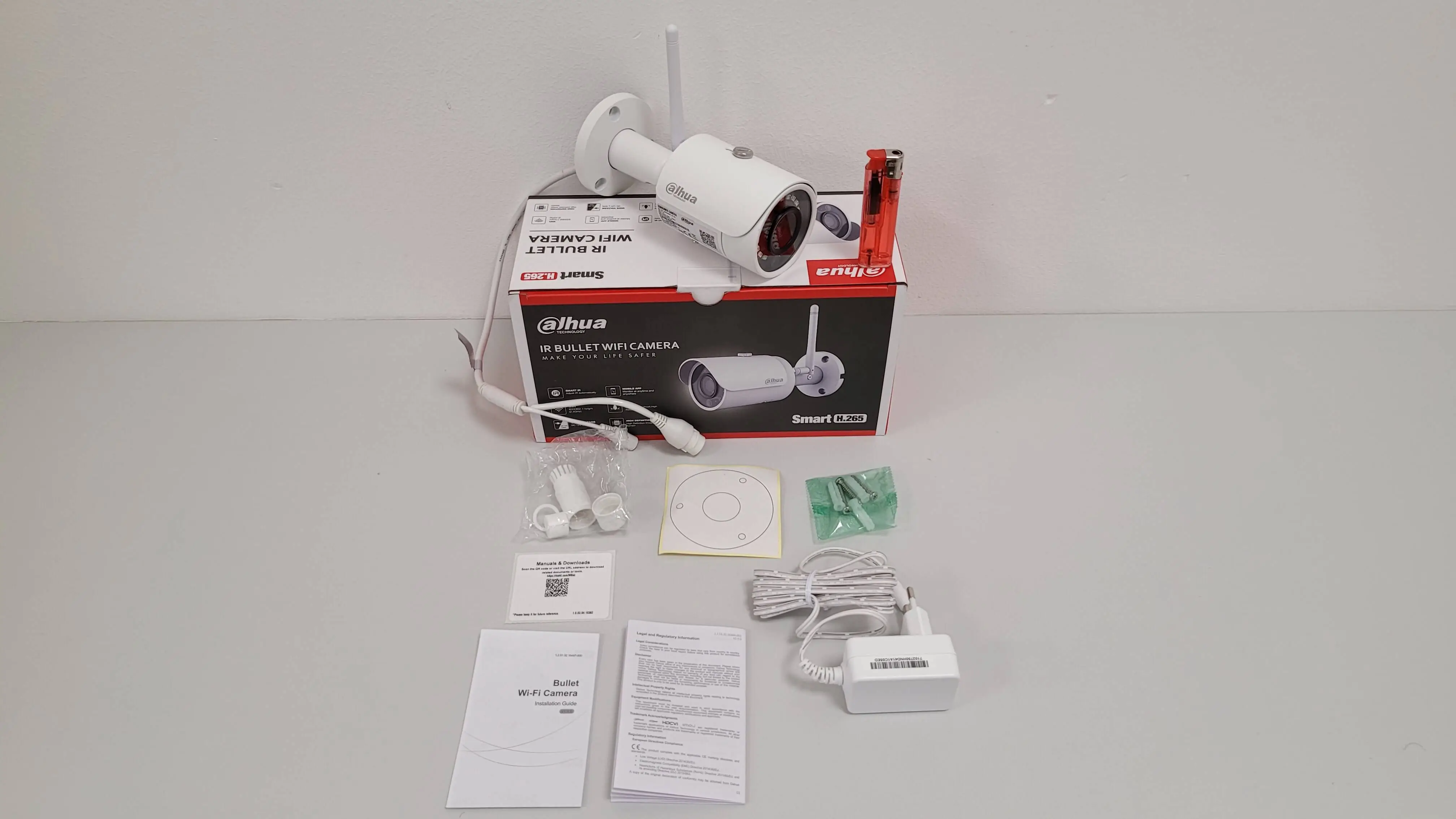
The scope of delivery of the Dahua DH-IPC-HFW1435S-W-0280B-S2 WLAN surveillance camera includes, in addition to the camera, a power supply for powering the camera and a template for marking the drill holes to make installation easier. An SD card for recording directly on the surveillance camera is not included in the scope of delivery.
The appearance of the Dahua camera seems relatively small and inconspicuous for a bullet camera. The antenna blends in reasonably well with the overall look of the WLAN camera, although it is a little intrusive. The surveillance camera is built from high-quality metal and, apart from the antenna, contains no plastic components.
Commissioning and setup of the camera
Thanks to the Toolbox software, which is offered as a free download on the Dahua internet platform, the Dahua DH-IPC-HFW1435S-W-0280B-S2 WLAN surveillance camera is surprisingly easy to configure. Once the Toolbox has been saved to the PC, the Configtool must be launched from the Toolbox so that the camera can automatically be searched for on the network. As soon as the camera is found on the network, it is activated and protected with a password. After activation, the Dahua WLAN camera can be set up and operated via the QR code on a mobile device such as a cell phone or tablet, as well as on an NVR (Network Video Recorder) and NAS (Network Attached Storage).
Mounting and mounting options
Once the DH-IPC-HFW1435S-W-0280B-S2 WLAN surveillance camera has been screwed to the wall, its field of view can be manually adjusted to the desired image area with little effort thanks to the double joint. With additional accessories that must be purchased separately, the Dahua camera can also be mounted on a pole. Since the Dahua WLAN camera has no batteries for an independent power supply, when choosing the mounting location, make sure there is an existing power outlet in the immediate vicinity of the camera.
Security of the camera on the software and hardware side
As far as the software security of the Dahua camera is concerned, it supports 64/128-bit WEP, WPA / WPA2, WPA-PSK / WPA2-PSK encryption of the WLAN connection. The surveillance camera can be given a personal password in the settings and secured against unauthorized access.
On the hardware side, the small bullet camera is equipped with an IP 67 protection rating against harsh weather conditions, which allows an operating temperature of -30° to +50°, which is surprisingly good. Based on the information in the manufacturer's data sheet, it is not clear whether the DH-IPC-HFW1435S-W-0280B-S2 has an IK rating for vandal resistance. Since this is a bullet camera, whose design only rarely offers protection against vandalism, we do not expect this in this price segment. Thanks to the built-in RJ45 network port, the IP camera can even be operated via a network cable, which significantly increases security. We find it a little unfortunate that power over the network cable via PoE (Power over Ethernet) is not supported by the IP camera, so you always depend on an existing power outlet.
Recording options
The DH-IPC-HFW1435S-W-0280B-S2 has an SD card slot, so recordings of up to 256GB can be saved directly on the surveillance camera. Recording to a Dahua WLAN NVR that connects directly to the IP camera over WLAN is also possible. For space-saving recording without compromising on quality, the Dahua camera supports H.264 and H.265 compression.
Thanks to ONVIF compatibility (Profile T/Profile S/Profile G), the Dahua camera can work independently of manufacturer with any ONVIF-compatible device, such as an NVR or NAS, and store the surveillance recordings. This capability of the Dahua camera not only increases the security of the video surveillance but also its flexibility, which in our view is a major advantage for the customer. From our perspective as security experts, and in the customer's interest, we believe that so-called closed video surveillance systems, which are not ONVIF-compatible and therefore effectively force the operator of the video surveillance system to stay with one manufacturer, are no longer acceptable today.
Relevant features for video surveillance
With its horizontal field of view of 97° and a resolution of 4 megapixels, the Dahua DH-IPC-HFW1435S-W-0280B-S2 is very well suited to adequate video surveillance, especially in the home security segment. The lens is not motorized and can only be zoomed digitally (picture-in-picture). The range of the infrared illuminators of up to 30 meters provides sufficient illumination at night for house and garden surveillance applications. Unfortunately, the motion detection of the Dahua camera only responds to pixel changes in the image area, which can certainly lead to false alarms under certain conditions such as heavy rain or snowfall. The data sheet lacks information on privacy masking options for image areas, which would help ensure the surveillance camera can be configured in compliance with GDPR, so one can only guess. Based on our tests, however, we can confirm configuration options for up to 4 different zones. Otherwise, the data sheet contains all the technical information needed to select the right surveillance camera.
3. Test EZVIZ C3W PRO 4MP
Scope of delivery, appearance and quality of the materials used
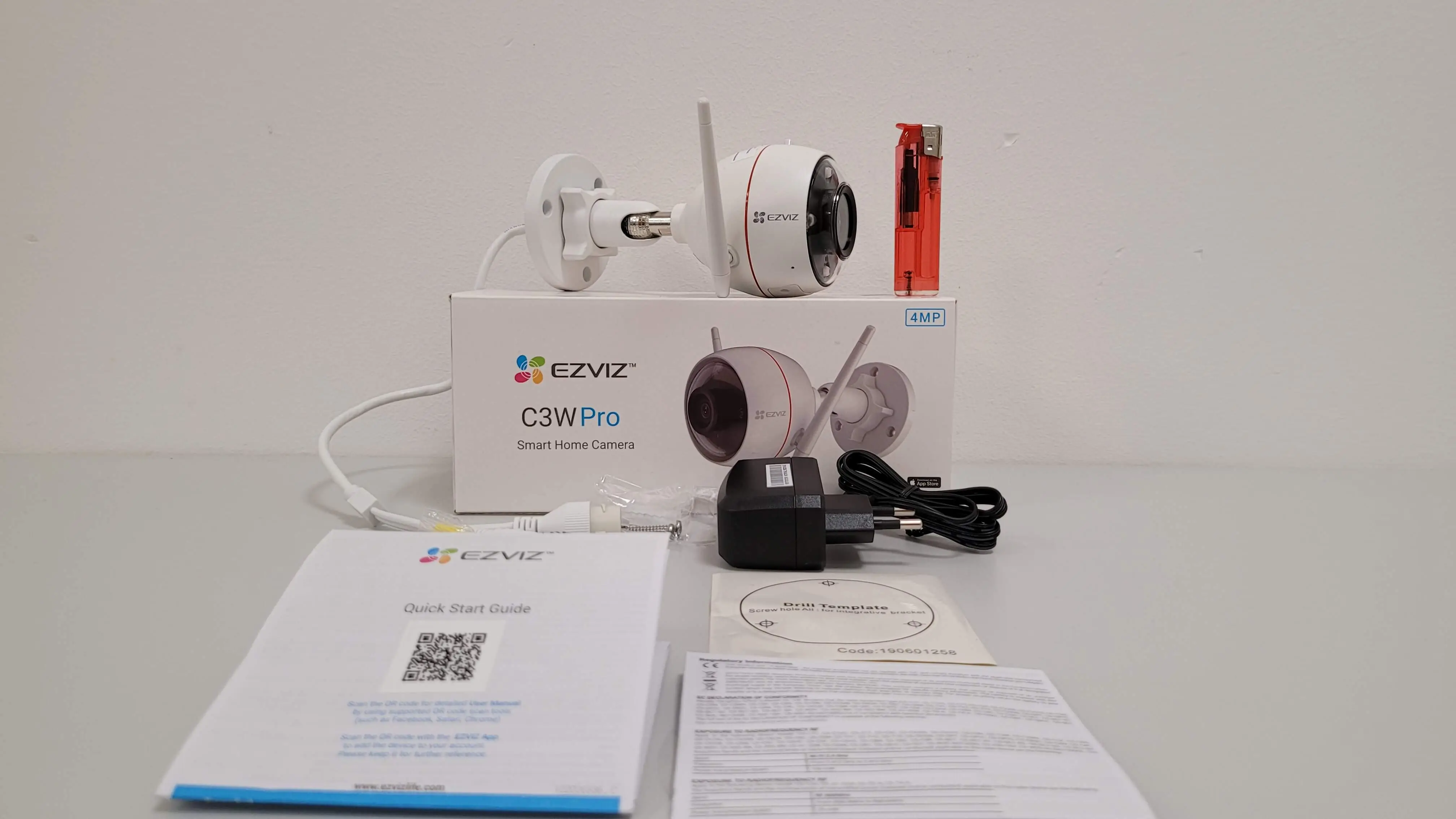
The EZVIZ CS-C3W-AO-3H4WFRL WLAN surveillance camera's scope of delivery includes the power supply for the power connection and a quick guide for setting up the app using a QR code. After scanning the QR code with the smartphone's camera, you are taken to the EZVIZ homepage, where several detailed user manuals are offered in different languages, but unfortunately only the English version works. An SD card for recording directly on the WLAN camera is not included in the scope of delivery and should be purchased before buying and commissioning the camera.
The appearance of the EZVIZ CS-C3W-AO-3H4WFRL WLAN surveillance camera is, in our view, a little too playful for a professional video surveillance look, due to the antennas attached on the left and right. Proportionally, the WLAN camera is quite small, but the prominent antennas make it a matter of taste in the overall look of a facade.
As for the build quality of the EZVIZ WLAN camera, apart from the plastic antennas it is constructed entirely of metal and leaves a good impression for the price.
Commissioning and Setup of the Camera
Commissioning the EZVIZ CS-C3W-AO-3H4WFRL Wi-Fi surveillance camera is extremely easy thanks to the existing network connection and requires no advanced networking knowledge. The IP camera must be connected to power and linked to the router with a network cable (not included in the scope of delivery). After you download and launch the app from the EZVIZ portal on a smartphone or tablet, scan the QR code with the phone's camera, and the Wi-Fi camera appears immediately. To operate the IP camera via Wi-Fi without a network cable, you first need to enter the Wi-Fi key in the app under camera settings. Only then can the IP camera be disconnected from the router. The second setup option for the EZVIZ Wi-Fi camera, directly through the app without using a network cable, takes a little more time but is also very simple. You only need to follow the visual instructions in the app and the audio prompts from the camera. Seen this way, installing the EZVIZ CS-C3W-AO-3H4WFRL Wi-Fi surveillance camera is exceptionally user-friendly and, in our opinion, a welcome plus, especially for beginners.
Mounting and Mounting Options
Thanks to its bullet design, the EZVIZ surveillance camera is very easy to mount without much effort. The existing pivot joint allows quick mechanical adjustment to the desired field of view without any hassle.
Unfortunately, EZVIZ does not offer any accessories for pole mounting, for example, which in turn limits the versatility of the Wi-Fi camera's mounting options. Since the EZVIZ CS-C3W-AO-3H4WFRL Wi-Fi camera has no batteries, a power outlet for the power supply should be located in close proximity during installation.
Camera Security – Software and Hardware
Software-side, the EZVIZ CS-C3W-AO-3H4WFRL surveillance camera from EZVIZ offers several encryption options, such as 64/128-bit WEP, WPA / WPA2, and WPA-PSK / WPA2-PSK, to ensure secure Wi-Fi transmission. The Wi-Fi camera can be protected against unauthorized access by setting a password in the security settings.
Hardware-side, the Wi-Fi camera is equipped with two antennas which, according to the manufacturer, significantly improve the reliability and range of the Wi-Fi connection. Our technician is still testing these values in a long-term test. The results will be added here shortly. For its size, the EZVIZ CS-C3W-AO-3H4WFRL is very robust and certified IP67 for protection against water and dust. According to the manufacturer, the EZVIZ camera has a good operating temperature range of -30° to 60° for outdoor use.
Recording options
Since the EZVIZ CS-C3W-AO-3H4WFRL unfortunately is not ONVIF-compatible, it only allows recording to an SD card of up to 256GB, via the EZVIZ Cloud for a fee, or to an EZVIZ's own NVR, which in turn quietly increases the acquisition costs of the video surveillance with this Wi-Fi camera. Integrating the IP camera into third-party video surveillance systems is not possible and is therefore rated as a drawback according to our expertise. As already mentioned above, security experts advise against storing surveillance files in clouds outside the EU. Recordings made exclusively on the SD card are also relatively insecure in the event of theft of the surveillance camera. The most secure method to reliably save the surveillance images of the EZVIZ CS-C3W-AO-3H4WFRL surveillance camera is an NVR – network video recorder.
Otherwise, the EZVIZ camera is equipped with efficient H264 and H265 compression methods to enable space-saving recording without loss of quality.
Relevant features for video surveillance
The EZVIZ Wi-Fi camera is equipped with a lens that produces a horizontal viewing angle of 103°. The lens is not movable and therefore does not offer optical zoom, only digital (picture-in-picture) zoom functions. According to the manufacturer, the surveillance camera is equipped with AI (artificial intelligence)-based motion detection for optimal person detection. Our technician is currently examining these claims in a long-term test and will publish the details here once it is complete. For securing private property, the infrared illuminators of the EZVIZ CS-C3W-AO-3H4WFRL have a suitable range of up to 30 meters, along with two white light illuminators that are intended to enable color images at night.
Regarding alerting, the EZVIZ surveillance camera has a speaker and a microphone, which not only enable bidirectional communication from a distance with the location, but also automatically play preset voice recordings as a warning when potential intruders approach. These two features of the EZVIZ camera are, taking into account the legally applicable data protection regulations regarding audio recordings, a preventive function that can indeed effectively deter intruders. Please also note that the camera does not support privacy zone masking. Masking is ideal for situations in which a certain field of view of the camera must not or may not be monitored, such as a neighboring property. This is especially important with regard to European and German data protection law and is a very major drawback of this camera.
4. Test Hikvision DS-2DE2A404IW-DE3/W(2.8-12mm)
Scope of delivery, appearance and quality of the materials used
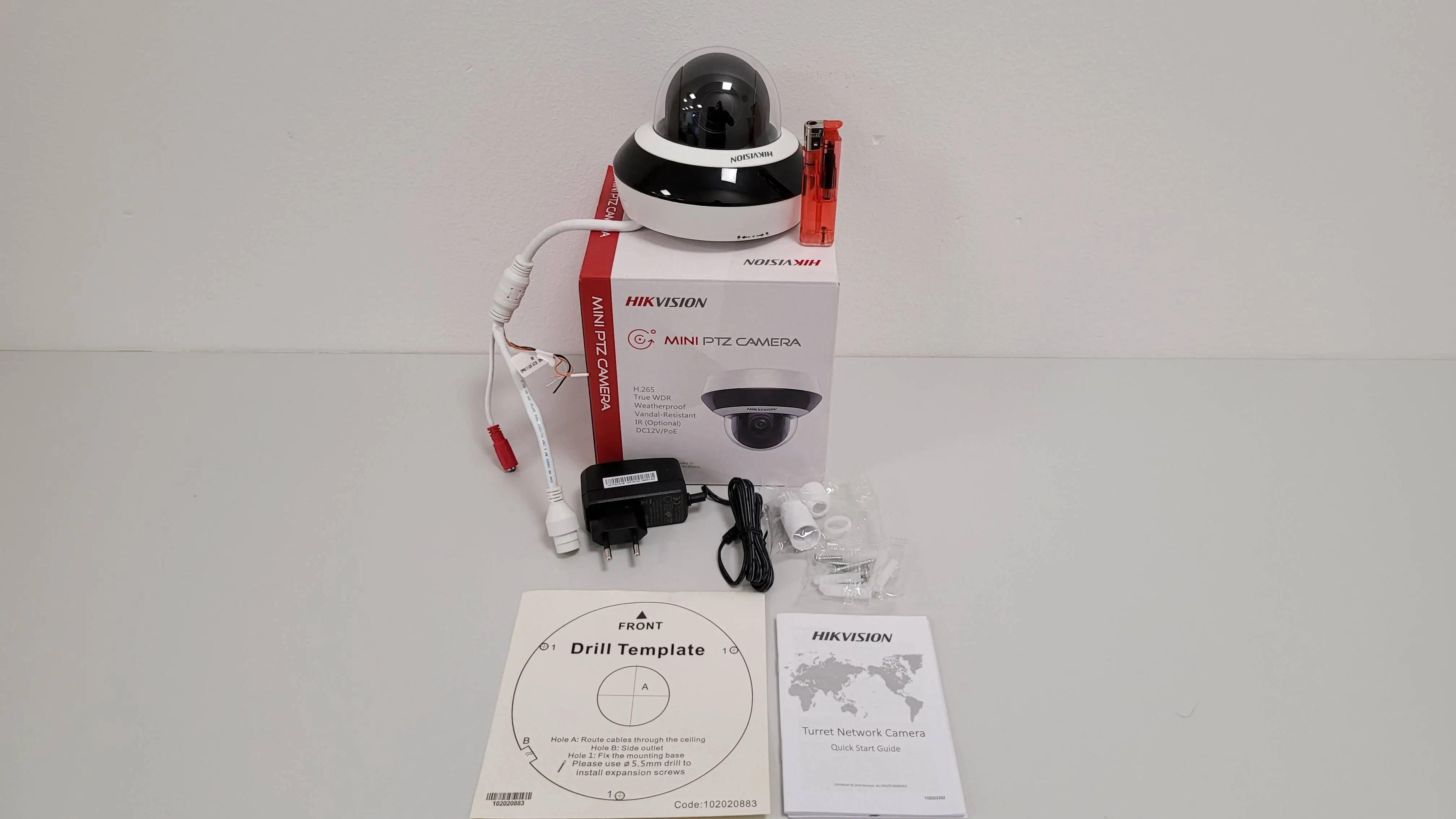
The Hikvision DS-2DE2A404IW-DE3/W(2.8-12mm) is a small Wi-Fi dome camera with PTZ (pan/tilt/zoom) that can be panned, tilted and zoomed.
The scope of delivery of the Hikvision camera includes a power supply for the power supply unit, a drilling template to simplify installation, and 2 sealing accessories to seal the cable connection of the surveillance camera against rain. The scope of delivery does not include an SD card for recordings; this should be taken into account when purchasing.
The appearance of the Hikvision camera is very high-quality and blends well into any video surveillance setup. As for the materials used, the surveillance camera is made almost entirely of metal. Only the 360° cover of the infrared emitters and the dome are made of acrylic glass.
Commissioning and setup of the camera
Commissioning the Hikvision camera is very easy thanks to the included SADP tool. After the DS-2DE2A404IW-DE3/W(2.8-12mm) has been connected to a power source, the free SADP tool must be downloaded from the Hikvision homepage to a PC and launched. The DS-2DE2A404IW-DE3/W(2.8-12mm) can be connected either via the included power supply plugged into a power outlet, or via PoE (Power over Ethernet), i.e. via network cable. To operate the IP camera via PoE, a PoE injector or PoE switch is required. So that the IP camera can be found quickly and easily on the network, we recommend connecting it to the router or switch with a network cable. As soon as the IP camera is displayed by the SADP tool, it must be activated. For security reasons, activating the Hikvision camera requires a personal password of at least 8 letters and numbers. In the SADP tool, you can either assign the IP camera a fixed IP address or switch it to DHCP so that the router automatically assigns it an address. Once the IP camera has an IP address, it can be configured via the browser for the required surveillance application and integrated into the network via Wi-Fi or LAN. Setting up mobile access via a smartphone or tablet is also done via browser access and requires the Hik-Connect APP to be installed on the mobile device beforehand. Hikvision also enables further remote access to the surveillance camera from a PC using the VMS (Video Management Software) IVMS 4200. Both software packages, the APP and the VMS, can be downloaded free of charge from the Hikvision platform.
A major advantage of the DS-2DE2A404IW-DE3/W(2.8-12mm) is its versatile operating options: the surveillance camera can be powered either via Wi-Fi/power outlet, Wi-Fi/PoE injector, or network cable and PoE.
Installation and mounting options
Mounting the dome camera is a little more involved than mounting a bullet camera, but not overly complicated. To attach the Wi-Fi camera, the housing must first be opened. As mounting options, the DS-2DE2A404IW-DE3/W(2.8-12mm) offers wall mounting, which requires an additional wall mount bracket, or ceiling mounting without any further accessories. With additional accessories, the Hikvision camera can also be suspended from the ceiling at a desired height. Vertical mounting on a wall is possible thanks to the PTZ function, but it would not make sense and is therefore not recommended. The versatile operating options of the DS-2DE2A404IW-DE3/W(2.8-12mm) provide a certain independence from an available power outlet in the immediate vicinity of the surveillance camera through the use of a PoE injector.
Thanks to its zoomable and pivotable lens, adjusting the dome camera to the desired surveillance area is electronic and therefore child's play.
Camera Security: Software and Hardware
For Wi-Fi operation of the surveillance camera, Hikvision provides various encryption options on the software side, such as 64/128-bit WEP, WPA/WPA2, WPA-PSK/WPA2-PSK, and WPS. To operate the IP camera securely over a wired connection without Wi-Fi, many options are available, such as user authentication, host authentication, and HTTPS encryption.
On the hardware side, the Hikvision camera is protected against weather influences with an IP66 protection rating and lightning protection, and it supports an operating temperature of -20° to +60° Celsius. The DS-2DE2A404IW-DE3/W(2.8-12mm) is also very well protected against vandalism, with an IK10 impact rating.
Recording Options
The DS-2DE2A404IW-DE3/W(2.8-12mm) from Hikvision is ONVIF-compatible and accordingly offers flexible integration of the IP camera into various video surveillance systems. In addition to storage of up to 256GB on an SD card directly in the surveillance camera, Hikvision also enables recording to its own NVR network video recorder or to a NAS (Network Attached Storage). A major advantage comes from the ONVIF compatibility of the Hikvision surveillance camera, which also allows recordings to be saved to other storage media from third-party manufacturers that are ONVIF-compatible. To ensure efficient, storage-saving recording without loss of quality, the Hikvision camera is equipped with H.264, H.265, and even H.265+ compression methods. The H.265+ compression sets the Hikvision camera apart positively from the other test candidates.
Relevant Functions for Video Surveillance
With the DS-2DE2A404IW-DE3/W(2.8-12mm), Hikvision offers not only an extensive but also professionally oriented camera feature set for video surveillance. The data sheet of the Hikvision camera not only contains all necessary technical data, but is also very detailed, making it easier for laypeople to make a purchase decision based on technical values.
In addition to the advantages of the motorized lenses, the Wi-Fi camera is equipped with versatile motion detection and alarm settings, such as motion and face detection, intrusion detection, removal of objects from the image area, and more. Especially for securing private properties, the line crossing function is very effective in avoiding unwanted false alarms. The option to set up to 24 different privacy masking areas in the image also sets the Hikvision camera apart. The range of the infrared illuminators, 20 meters at 355° all around, is somewhat on the short side, but still quite acceptable for home security surveillance applications. Thanks to the high light sensitivity of the image sensor, 0.001 lux in black-and-white mode and 0.005 in color mode, the DS-2DE2A404IW-DE3/W(2.8-12mm) provides a good compensation for the range of the infrared illuminators.
The lens offers 4x optical zoom and can be panned 355° left and right as well as tilted 90°.
The DS-2DE2A404IW-DE3/W(2.8-12mm) is equipped with a microphone that, in compliance with GDPR requirements, enables two-way communication in combination with a speaker. However, the surveillance camera does not have an integrated speaker, only an input for one, so additional costs may arise if needed.


