

In this blog post, we would like to give you a guide on how to reset the admin password on HIKVision network video recorders (NVRs) that have no reset button.

Our security experts are often asked how to reset the password of a Hikvision network video recorder (NVR) using the so-called SADP Tool from HIKVision .
Because Hikvision devices do not have a reset button installed for this purpose, alternative methods must be used to reset the password. These are somewhat more complicated, but this ensures a particularly high level of security, so that no unauthorized person can gain access to your devices.
Resetting the Password Using the Hikvision SADP Tool
Before you reset the password of your Hikvision network video recorder (NVR) using the SADP tool, please make sure that you have installed the latest version of the tool. You can download the tool from the Hikvision website.
Then follow these steps:
- The network scan detects the devices connected on the LAN. Select the desired device by placing a checkmark next to it.
- Click "Forgot Password".
Depending on the system, firmware and device, one of three possible messages will now be displayed:
1.) You will be asked to enter a Security Code (security key). You will receive this from HIKVision or from GermanProtect by email. Feel free to write us a message at [email protected]. Please provide your name, the exact problem, the serial number of the device and the "Start Time" shown in the SADP tool in the exact format.
You will then receive several security codes showing different dates. Please select the code for the reset that matches the current system time. Then click "Confirm", and the device will be reset to the default password "12345" (without quotation marks).
2.) You will be prompted to work with an "Encrypt File" (encrypted file). This file in XML format must first be created by clicking the "Export" button, and then sent by you to [email protected]. In response, you will then receive another XML file from us, which you can load back into the system by clicking the "Import File" button. Afterward, you can set a new password and confirm it with "Confirm". Please note that this received file is valid for only 24 hours. The device must not be switched off during the entire process, and the file name must not be changed.
3.) The SADP tool prompts you to enter a “Key” or import a file. The file is imported in a similar way to the previous step. Alternatively, you can take a photo or screenshot of the displayed QR code and send the image to [email protected]. You will then receive an eight-digit key from us, the “Key” mentioned above. Enter it under “Input Key”, choose a new password and confirm it with “Confirm”. Optionally, the passwords of all surveillance cameras can also be reset this way if the device is an IP recorder.
Please note that this tool can only be used if the device is integrated into the local network and the computer used is on the same network. This ensures that no one from outside can establish this connection.
If errors occur while resetting the password, it is very important to write them down exactly. Also make sure that no Wi-Fi is enabled.
Resetting the password with a self-created backup file
You can also reset the password of your Hikvision device without external support. This works with network video recorders of the -E, /K and /-I series that use firmware version 3.4.90 or later. It is also possible for the Turbo 3.0 DVR (DS-HG/HQ/HUHI-F) with firmware 3.4.80 or later.
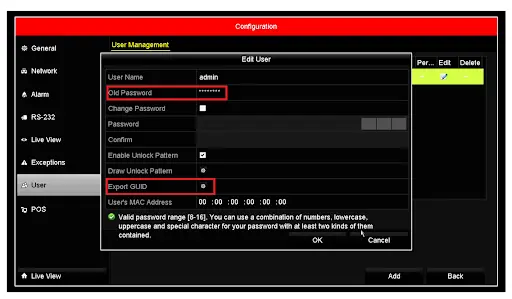
For a later password reset, export a GUID file during installation beforehand and save it. You can use this file to restore your password if needed.
In the user interface of your NVR, navigate to “User” and then select “Export GUID”. For this process you will need your old password. Attention: the GUID file becomes invalid if the admin password is changed or the GUID file is used.
If you have forgotten your password, click “Forget Password” in the user interface.
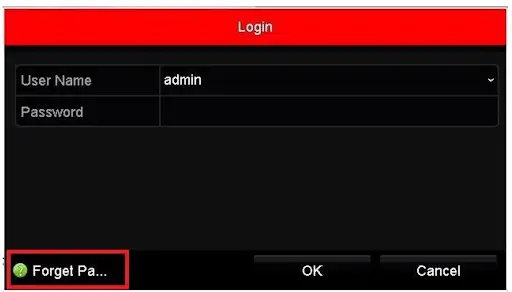
Then import the GUID file you exported earlier.
Resetting the password using security questions
As a further alternative, you can set up security questions that must be answered correctly if a password needs to be reset.
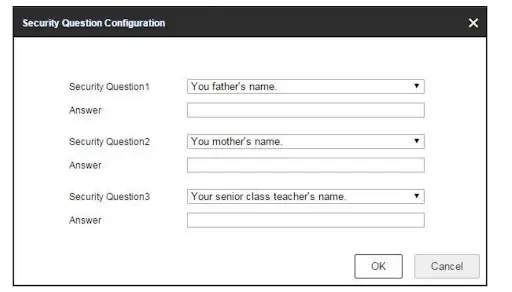
Please note that you must answer the questions exactly and character for character. Different spellings will therefore not be accepted.
It is important that the answers to the questions are known only to you and trusted persons.
Problems resetting the Hikvision password
If you have trouble resetting the password of your Hikvision device using one of the methods described, this may have one of the following causes:
- The device was switched off after the Encrypt file was sent to customer service.
- The 24-hour validity period of the received Encrypt file has expired.
- The NVR and the computer used for the reset are not on the same local network (LAN).
- The NVR is not on the local network (LAN).
- You made a typo in at least one of the answers to the security questions.
- When using a GUID file: The admin password has been used in the meantime, or the GUID file has already been used.
Are you having trouble with the password of your Hikvision device?
Simply get in touch with us. We are also happy to advise you on your options before you buy. We look forward to hearing from you!
Other helpful topics for HikVision products:
Instructions for setting up Hik-Connect


